
For Dental Clinics
Dental Intake Call Management
Filter CDCP inquiries, manage new-patient calls, and collect callback requests — all before they reach your front desk.
Built for dental clinics dealing with CDCP inquiries, new-patient calls, and front-desk overload.
ClinicHub is an intake call management layer that sits in front of your existing phone line.
The Canada Dental Care Plan has created a surge of phone calls to dental clinics — alongside the constant flow of "Are you accepting new patients?" inquiries.
ClinicHub manages intake calls before they reach your staff, giving clinics control over when calls ring through — and when new patients are collected for follow-up instead.
- CDCP callers get an SMS with official Gov't info
- New patients ring through or join a callback waitlist
- Existing patients transfer to reception or leave a callback
$69/month — No contracts — Cancel anytime
See It In Action
This demo shows a clinic accepting CDCP patients with callback waitlist turned on. You can also set up options for new patients, existing patients, and more — this is just one example of how ClinicHub works.
How Calls Flow
How Calls Flow
Every call is handled automatically based on who's calling and your intake status.
Call
Menu
or Existing Patient
SMS
Waitlist (optional)
Reception
ClinicHub was built around the real CDCP issues dental teams are facing
CDCP isn't just more calls — it's more confusion
- Patients call repeatedly because they don't understand eligibility, copays, or coverage limits
- Front desks spend time explaining CDCP rules they don't control
- Misunderstandings about "free" coverage create conflict and frustration
- Voicemail and repeat calls compound the admin burden
ClinicHub reduces CDCP confusion by handling the first conversation clearly and consistently — before it reaches your staff.
The 3 CDCP calls that burn out front desks
"Am I covered / did I apply / do I qualify yet?"
"It says 40% copay — why do I still owe money?"
"Why isn't this covered if I just had treatment?"
These calls aren't clinical — they're administrative. ClinicHub handles them consistently so your team doesn't have to repeat the same explanations all day.
Expectation setting (not coverage advice)
ClinicHub does not determine eligibility or coverage. Instead, it sends short, clinic-approved messages that explain next steps and link to official Government of Canada information — reducing repeat questions and misunderstandings.
Built for dental clinics where intake calls interrupt patient care
Why front desks are getting crushed
- CDCP created a new category of calls (eligibility, where to apply, "do you accept?")
- Patients think CDCP = "free dental" — staff spend time correcting expectations
- Existing patients wait while intake calls interrupt the desk
- Voicemail backlogs create hours of cleanup and still don't stop repeat callers
ClinicHub stops the disruption before it reaches reception.
What changes in week 1
CDCP callers get their own path
No more repeating coverage rules — IVR handles it
Pre-written CDCP SMS templates
Remind patients about co-pays and coverage limits
Fewer interruptions
During checkout and patient care
A clean callback list
Your team can work through between patients
Why dental intake calls are overwhelming front desks
CDCP questions flood the phones
Since the CDCP launched, dental clinics have seen a surge of calls asking about eligibility, coverage, and enrollment.
Staff repeat the same answers
Front desk staff explain CDCP next steps and new-patient availability dozens of times per day.
Existing patients get put on hold
Booking confirmations and patient care conversations are constantly interrupted by intake calls.
Voicemail piles up
Missed calls create a backlog that takes hours to clear — often just to say "not accepting."
ClinicHub intercepts intake calls before they reach your front desk.
What ClinicHub Does — And Doesn't Do
ClinicHub manages intake call routing and callback waitlists — not clinical decisions or patient care.
What ClinicHub Does
- Routes CDCP, new-patient, and existing-patient calls with clear menu options
- Collects callback requests from any caller type when enabled
- Sends automated SMS follow-ups so clinics can respond when ready
- Gives existing patients the choice to transfer or leave a callback
What ClinicHub Doesn't Do
We never provide dental recommendations or treatment guidance.
Your existing phone system stays fully in place.
We do not store or integrate with clinical charts or EMRs.
Current patients choose: transfer to reception or leave a callback request.
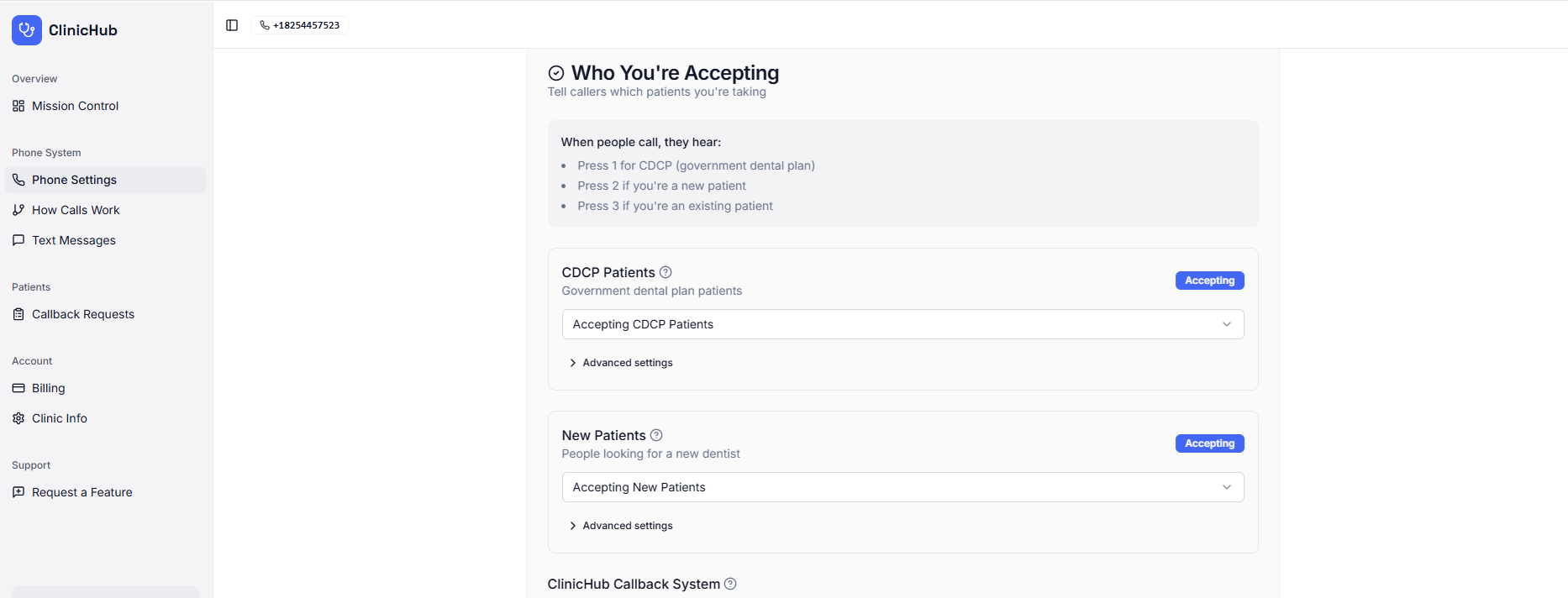
Control CDCP, new-patient, and existing-patient intake — plus ClinicHub's callback waitlist — from one simple dashboard
Why a Callback Waitlist Is Better Than Voicemail
Callback waitlists replace unstructured voicemail with a clear, manageable intake list.
Voicemail wasn't designed for today's intake volume. ClinicHub's callback waitlist gives clinics a cleaner, more controlled alternative.
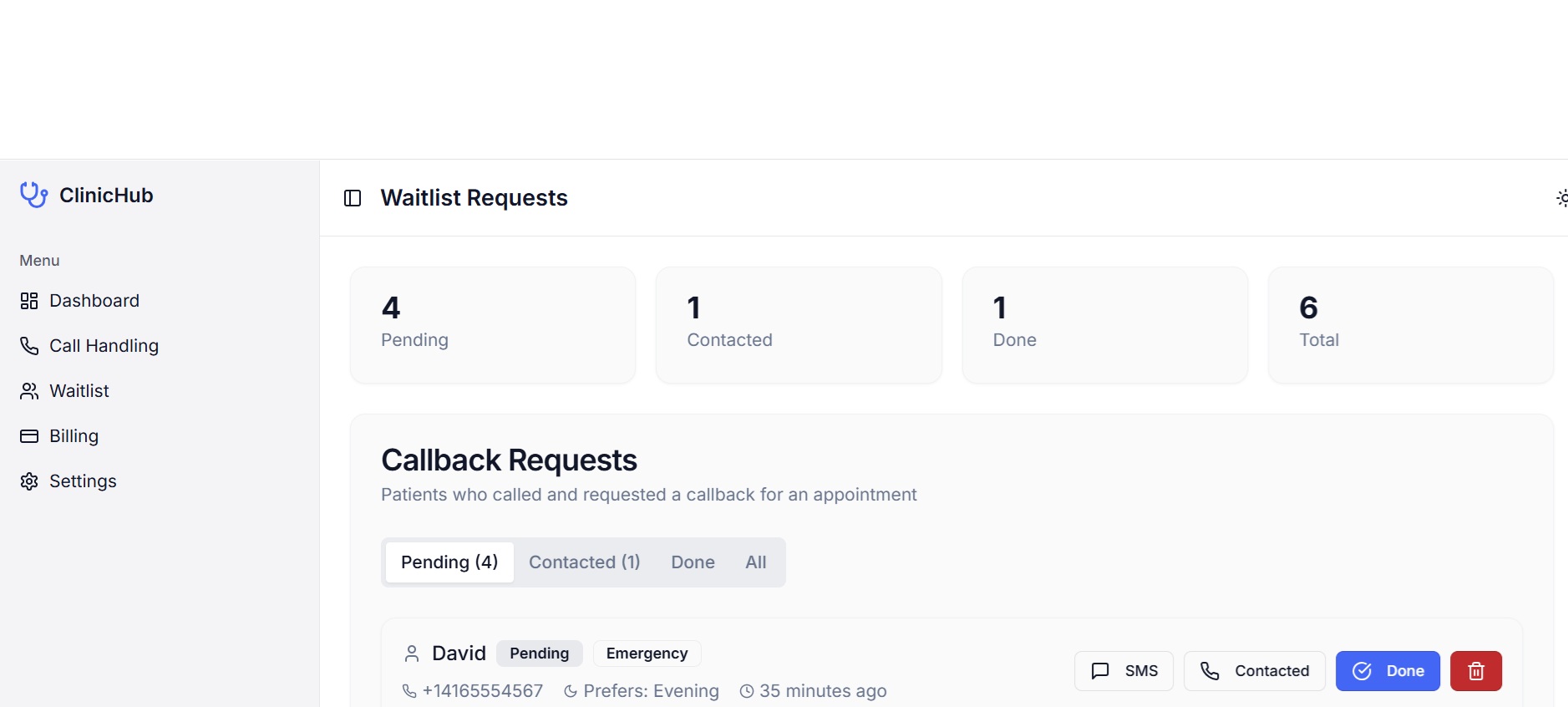
Your callback waitlist dashboard — structured requests your staff can work through at their own pace
Voicemail creates work
- Long, unstructured messages
- Missing or unclear information
- Replaying messages multiple times
- Phone tag and repeated callbacks
- No clear way to track what's done
Callback waitlists create control
- Patients leave structured information
- One request per patient
- A clear list staff can work through
- Easier follow-up without phone tag
- You can SMS directly from the callback waitlist
ClinicHub vs the Status Quo
A quick comparison of intake handling with ClinicHub vs traditional voicemail.
| Intake Handling | ClinicHub | Traditional Phone + Voicemail |
|---|---|---|
| CDCP calls | Automatically separated and handled with clear messaging | Ring the front desk or go to voicemail |
| New-patient availability calls | Answered automatically based on intake status | Repeated live calls interrupt staff |
| Existing patient calls | Transfer to reception or leave a callback request | Mixed in with intake calls |
| Front-desk interruptions | Reduced | Constant throughout the day |
| Intake messaging | Consistent, professional voice messages | Varies by staff member and time of day |
| CDCP next steps | One-time SMS with official information | Staff repeat explanations manually |
| Voicemail volume | Reduced or eliminated for intake calls | Backlogs build up quickly |
| Intake handling when busy | Callback waitlist | Calls ring or go unanswered |
| Information captured | Structured and organized | Unstructured voicemails |
| Duplicate calls | Reduced | Same callers often call multiple times |
| Follow-up tracking | Status-based list | Manual notes or memory |
| Daily visibility | Waitlist summary | No overview without checking voicemail |
| Clinic control | Clinics choose when calls ring | Phones ring whenever someone calls |
| Workflow disruption | Minimal | High |
ClinicHub doesn't change how your clinic works — it changes when your phone rings.
Time Saved at the Front Desk
Intake calls add up fast. ClinicHub gives that time back.
- Fewer interruptions during patient care
- No voicemail backlog to clear
- Staff focus on in-office patients
For many clinics, avoiding one or two unnecessary interruptions per week offsets the monthly cost.
Based on typical call volume and staff handling time — actual results vary by clinic.
Never Miss a Call — Even If ClinicHub Goes Down
Built-in redundancy means your phones never stop working. If ClinicHub ever experiences an outage, calls automatically route to your reception — just like before.
Failover activates instantly. Your patients never hear an error. Business continues uninterrupted.
Zero risk. ClinicHub is an enhancement layer — your existing phone number and reception remain fully functional.
How the Callback Waitlist Works
When enabled for new patients:
Calls do not ring reception
New patient calls are handled by ClinicHub instead of ringing through.
Callers are offered a callback instead
Patients can request to be called back at a time that works for them.
Patients provide:
- First name
- Phone number
- Reason for visit (general category)
No medical history or clinical details are collected.
How Clinics Manage the Waitlist
Clinic staff see a simple list where they can:
- View new callback requests
- Send SMS confirmations or follow-ups
- Mark requests as contacted or completed
- Ignore duplicates or spam
Daily Waitlist Summary
Clinics receive a daily overview showing:
- New requests received
- Requests completed
- Requests still pending
There is no voicemail inbox to clear and no guessing what's been handled.
ClinicHub Intake Call Setup
A guided walkthrough showing how to configure call handling, intake settings, and callback workflows for your dental clinic.
Call comes in
A patient calls your existing clinic number — no changes to your phone setup.
Caller selects their reason
Clear menu options: CDCP inquiry, new patient, or existing patient.
Press 3: Existing patients
Waitlist off: Calls transfer directly to reception
Waitlist on: Collect callback info, then transfer
Press 2: New patients
Accepting: SMS with welcome info sent, callback waitlist option
Not accepting: Callback waitlist or status message
Press 1: CDCP callers
Accepting:
CDCP ID sub-menu: Has ID transfers to reception; Needs info sends SMS with program details; callback waitlist option
Not accepting:
Callback waitlist or status message with Sun Life provider search link
Existing-patient calls are never altered. Reception workflow stays the same.
Complete Call Flow Overview
You don't need to design or remember this — ClinicHub configures and maintains the call flow for you.
This diagram shows the complete ClinicHub dental call flow. Each step is fully configurable by the clinic — including whether existing patients, new patients, or CDCP callers are routed to reception, sent information by SMS, or placed into a controlled callback list instead of voicemail. All settings can be adjusted at any time.
Calls always begin in English, with the option for callers to select from 12 supported languages using simple keypad choices (e.g., "Press 2 for French"). Once selected, all messages follow the chosen language. Existing workflows remain unchanged unless you choose otherwise.
SMS Messages Your Patients Receive
Patients receive helpful text messages based on your clinic status. Select messages can be customized from your dashboard's SMS Templates.
CDCP Accepting
CDCP info: canada.ca/dental
Reply STOP to opt out.
ClinicHub
Includes official Government of Canada CDCP link
CDCP Not Accepting
Find a CDCP provider: sunlife.ca/cdcp
Find a dentist: cda-adc.ca/en/oral_health/talk/find.asp
Reply STOP to opt out.
ClinicHub
Helps patients find CDCP providers via Sun Life and dentists via CDA
CDCP Callback Waitlist
While you wait, make sure you've applied for CDCP: canada.ca/dental
Reply STOP to opt out.
ClinicHub
Confirms waitlist signup with CDCP application link
New Patient Accepting
Reply STOP to opt out.
ClinicHub
Welcomes new patients to your practice
New Patient Closed
Find a dentist: cda-adc.ca/en/oral_health/talk/find.asp
Find a CDCP provider: sunlife.ca/cdcp
Reply STOP to opt out.
ClinicHub
Helps patients find dentists via CDA and CDCP providers via Sun Life
New Patient Callback
Reply STOP to opt out.
ClinicHub
Confirms new patient waitlist signup
Existing Patient Callback
Reply STOP to opt out.
ClinicHub
Confirms existing patient callback request
Existing Patient
Reply STOP to opt out.
ClinicHub
Sent when transfer is unavailable
Choose Your Clinic's Voice
Select from 4 professional AI voices to match your clinic's brand. All voices are powered by ElevenLabs.
Rachel
Warm, professional female voice
Drew
Friendly, approachable male voice
Adam
Clear, confident male voice
Sarah
Calm, reassuring female voice
All voices support 12 languages including English, French, Spanish, Mandarin, Cantonese, and more.
Hear What Callers Experience
Listen to actual IVR voice menus from a real dental clinic using ClinicHub.
Sunshine Dental Clinic
Rachel voice in English
Complete call handling for CDCP, new patients, and existing patients
- Accepting CDCP patients
- Member ID check (Has ID / No ID)
- No ID: SMS with CDCP program details
- Has ID: Collect callback + SMS confirmation
- Accepting new patients
- Waitlist enabled
- Collect callback + SMS confirmation
- Transfer to reception
- If answered: Connected
- If busy/no answer: Waitlist callback
Callback Waitlist Feature
Enable callback collection for any caller type: CDCP, new patients, or existing patients. Callers leave their name for a callback, your staff receives notifications, and callers get an instant SMS confirmation.
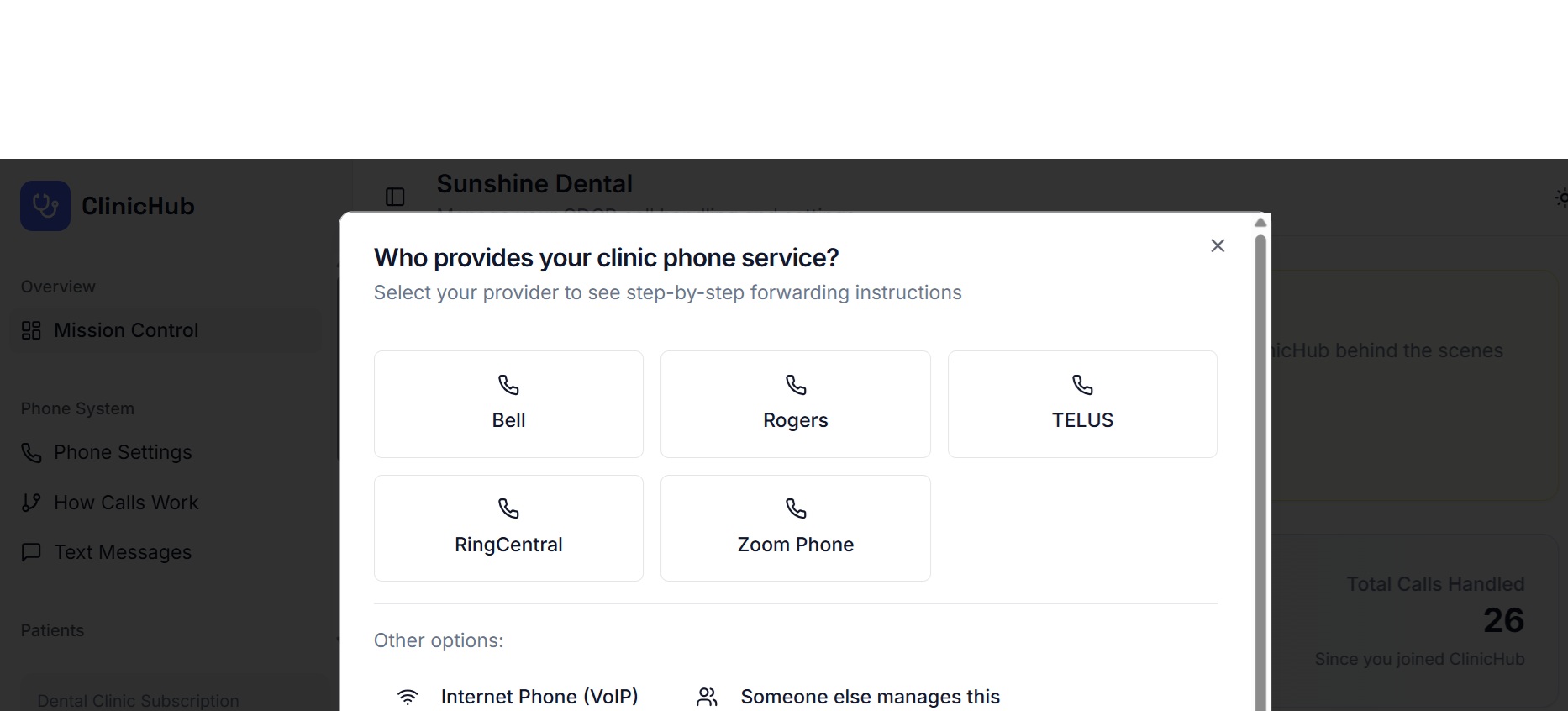
Call Forwarding Help Wizard
Not sure how to set up call forwarding? We've got you covered. Our built-in wizard walks you through the exact steps for your phone provider.
- Step-by-step instructions for major carriers
- Bell, Rogers, TELUS, and more supported
- Works with business phone systems too
- No technical expertise required
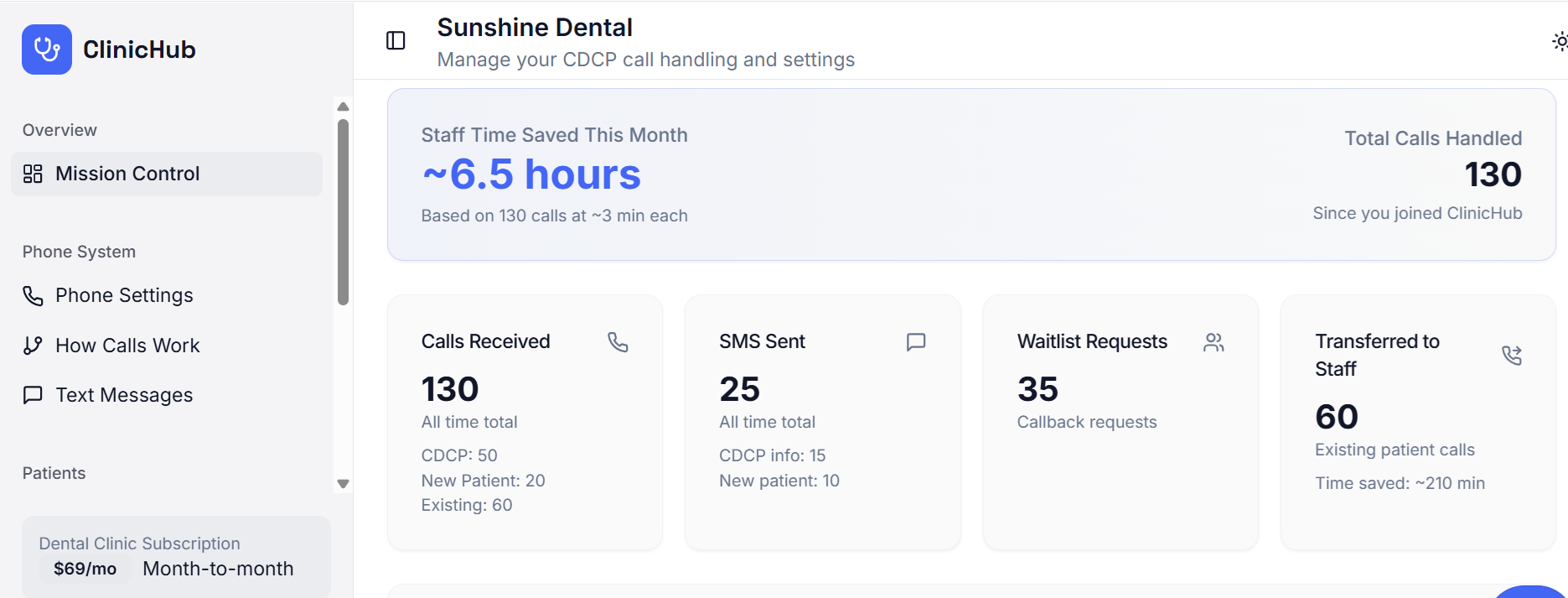
Mission Control Dashboard
See exactly how ClinicHub is saving your team time. Track calls handled, SMS messages sent, and patient callback requests all in one place.
- Staff time saved calculated automatically
- Breakdown by CDCP, new patient, and existing
- Track SMS info messages and waitlist requests
- Monitor calls transferred to your staff
Intake call handling features
Everything you need to manage CDCP and new-patient intake calls.
CDCP Intake Status
Set Accepting or Not Accepting for CDCP patients.
New-Patient Status
Separate status control for non-CDCP new patients.
Professional Voice Messaging
Clear, non-clinical language that sets expectations.
CDCP SMS Follow-up
Official Government of Canada links — once per caller.
Optional Call Transfer
Route appropriate calls to reception when you choose.
Call Simulator
Test the intake call flow before going live.
Your Live Call Flow Dashboard
See exactly how patient calls are routed through your system in real-time.
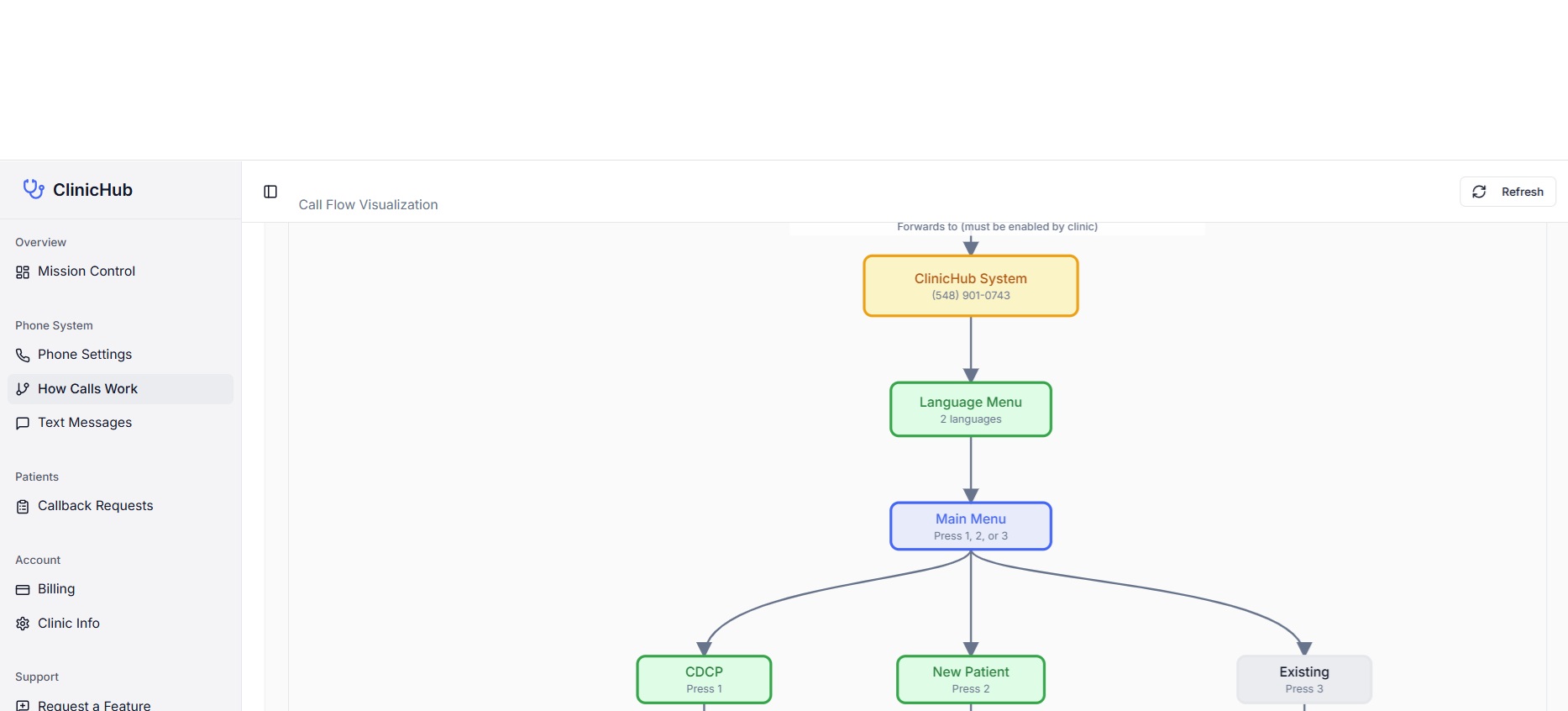
The "How Calls Work" dashboard — your visual truth of how your phone system is configured
Real-Time Visualization
The chart updates instantly as you change settings. See your phone numbers, call paths, and routing logic all in one view.
Complete Call Path
See every step from when a patient calls to the final outcome. CDCP, new patient, and existing patient flows displayed clearly.
Edit and Verify
Click "Edit Settings" to adjust your configuration, then return to see changes reflected immediately in the flow chart.
Training and Troubleshooting
Train staff on how calls are routed. Troubleshoot configuration issues by seeing exactly what your system will do.
Find it in your dashboard:
Phone System → How Calls Work
Simple, Transparent Pricing
Designed for single-location and multi-location dental clinics.
CDCP, New-Patient & Existing-Patient Intake
Complete call handling for dental clinics
per clinic
No contracts — cancel anytime
What's included
- CDCP call triage
- New-patient intake messaging
- Existing-patient call handling
- Callback waitlist (replaces voicemail)
- Separate CDCP, new-patient, and existing-patient controls
- Official CDCP SMS with Government of Canada guidance
- Optional call transfer to reception
- Callback waitlist management with daily summary
Bottom Line
Voicemail creates backlog.
Callback waitlists create control.
ClinicHub lets dental clinics decide when calls ring — and when they don't.
ClinicHub gives dental clinics a calmer, more organized way to manage CDCP and new-patient demand — without burning out the front desk.
Ready to reduce CDCP and new-patient intake calls?
$69/month • 14-day refund • Cancel anytime